Queenty: A Fun Handwritten Font for Web Design
As a web designer, I'm always on the lookout for fonts that can add a unique touch to my projects. Recently, I had the chance to test Queenty, a fun and casual handwritten font, in a real website layout. Let me share my experience with you.
First Impressions: Visual Charm and Personality
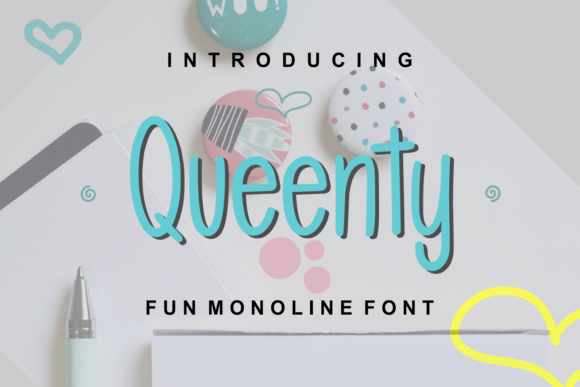
From the moment I saw Queenty, I was struck by its simple and charming personality. This handwritten font has a friendly, approachable vibe that makes it perfect for adding a personal touch to digital designs. Its clean lines and natural flow make it stand out without being too overbearing.
Testing Queenty in a Real Website Layout
I decided to test Queenty on a boutique online store I was designing. The goal was to create a welcoming and engaging user experience. Here’s how it performed:
- Hero Section: I used Queenty for the main heading in the hero section. The font's playful yet elegant style immediately set the tone for the site, making it feel inviting and unique.
- Mobile Responsiveness: One of the key aspects of modern web design is mobile responsiveness. Queenty scaled well on smaller screens, maintaining its readability and charm. This is crucial for a seamless user experience across devices.
- Call-to-Action (CTA) Buttons: I experimented with using Queenty for CTA buttons. While it looked great, I found that for optimal readability and impact, a cleaner, more legible font like a sans serif worked better for these elements.
- Product Descriptions: For product descriptions, I opted to use a simple sans serif font for the body text. Queenty, with its decorative nature, was not ideal for long-form content. However, it shone when used for short, impactful phrases and titles.
Visual Hierarchy and Branding
One of the most important aspects of web design is establishing a clear visual hierarchy. Queenty, with its distinct style, helped in creating a strong focal point. When used for headings and subheadings, it added a layer of creativity and personality to the site. This made the brand more memorable and engaging for visitors.
In terms of branding, Queenty's unique character can be a powerful tool. It can help in building a consistent and recognizable brand identity. For example, using Queenty for the logo and key brand messaging can create a cohesive and appealing look across all digital touchpoints.
Readability and Accessibility
While Queenty is visually appealing, it's important to consider readability, especially in web design. Here are some tips for using Queenty effectively:
- Headings and Titles: Use Queenty for headings and titles where the text is short and impactful. This ensures that the font's decorative elements enhance the design without compromising readability.
- Dark and Light Backgrounds: Test Queenty on both dark and light backgrounds to ensure it remains legible. I found that a slightly thicker weight or a subtle shadow effect can help it stand out more clearly.
- Image Overlays: When using Queenty over images, make sure there is enough contrast. A semi-transparent background or a slight drop shadow can help the text pop and remain readable.
Font Pairing and Versatility
To create a balanced and professional look, I paired Queenty with a clean sans serif font. This combination allowed the handwritten font to shine in key areas while maintaining overall readability and clarity. For example, using a sans serif for body text and Queenty for headings and callouts created a harmonious and visually appealing design.
Queenty also comes with several styles and alternates, which can be useful for adding variety and interest to your designs. Be sure to explore these options to find the best fit for your project.
Final Considerations
Before using Queenty in your web projects, it's essential to check a few things:
- Webfont Availability: Ensure that the font is available as a webfont. This will allow you to use it seamlessly across different browsers and devices.
- File Formats: Verify that the font includes the necessary file formats (e.g., WOFF, WOFF2, EOT, TTF, SVG) for web use.
- Multilingual Support: If your website targets a global audience, check if Queenty supports the languages you need.
- Commercial Licensing: Make sure you have the appropriate license for using the font commercially, especially if you plan to use it for client projects or e-commerce sites.
In conclusion, Queenty is a versatile and charming handwritten font that can add a unique and personal touch to your web designs. With careful consideration of its use and pairing, it can enhance the visual appeal and engagement of your digital projects. Whether you're designing a creative portfolio, a boutique online store, or a promotional landing page, Queenty is a font worth exploring.